Pyroscope 2.0 with Go: Finally Knowing Where Your Code Spends Its Time
"Slow in production, fast on my machine."
— A developer, every year since the dawn of time
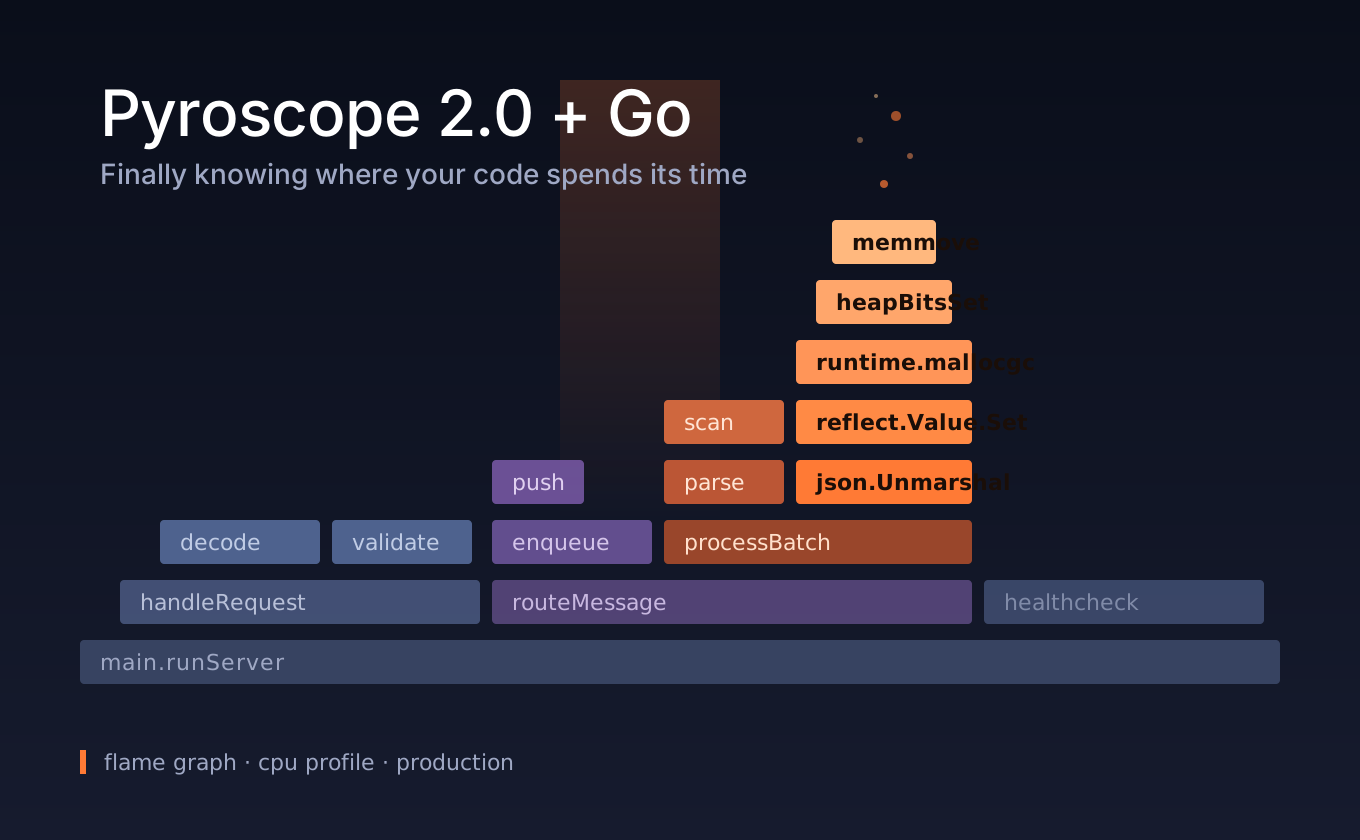
Picture a Go service in production. The CPU graph starts climbing a sweet little hill at 03:42 AM, p99 latency rockets toward the stars, and a Slack channel quietly enters panic mode. Your logs say one thing, your metrics say another, and your traces helpfully point to "this service is slow." But none of them tell you which function, on which line, is actually torching your CPU right now.
That missing link has a name: continuous profiling. And as of April 2026, with Pyroscope 2.0, this whole game just got cheaper and faster.
Let's wire it up with Go.
First, the obligatory question: why "continuous"?
The classic story goes like this: someone reports slowness, you SSH in, fire up pprof, and grab a 30-second profile. If the issue didn't happen during those 30 seconds, congratulations, you've wasted your evening. Worse, attaching a profiler can perturb the system — that delightful Heisenberg effect where observing changes the observed.
Continuous profiling flips this around: always on, very low overhead (typically 1-3%), and queryable retroactively. When something breaks, you can ask "what was happening a minute ago?" Metrics tell you there's a fire. Profiles tell you the fire is in the kitchen, on the gas valve, function by function.
What Pyroscope 2.0 brings (spoiler: a full architectural rewrite)
The least lovable thing about Pyroscope 1.x was that scaling it was real work. Replication was wasteful, read and write paths were tangled together, rollouts could take 8-12 hours. The kind of system where you needed a dedicated person just to operate it.
2.0 changes the foundation:
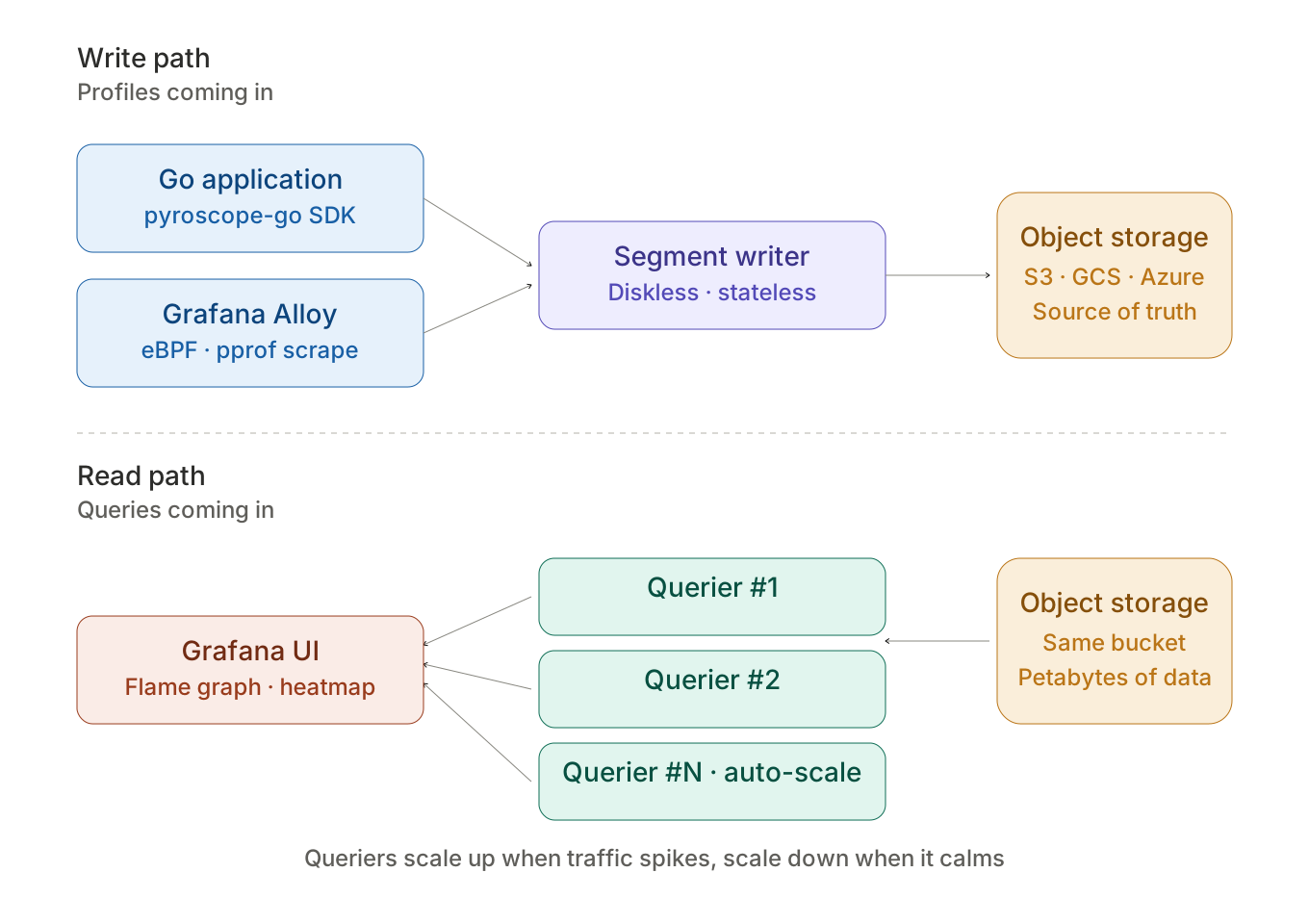
- Stateless queriers. When query traffic spikes — increasingly common now that LLM agents are autonomously scanning profiling data, welcome to the new world — capacity scales up, and shrinks back down when things calm. No paying for idle compute.
- Diskless segment writer. Store-gateway is gone. Fewer stateful components, fewer things that can break.
- Object storage as single source of truth. S3, GCS, Azure Blob, Swift — take your pick. Required for distributed deployments now, but no one was actually planning to keep petabytes of profile data on local disk anyway.
- Rollout time from hours to minutes. Operational surface area shrunk dramatically.
- Native OTLP profiling. OpenTelemetry's profile signal hit alpha, and Pyroscope now ingests profiles via OTLP. This is going to be the industry-standard format we look back on in a few years.
On top of all that, 2.0 unlocks features that simply weren't feasible before: metrics from profiles (compare resource consumption across services, versions, deployments), individual profile inspection (drill into one snapshot, not just aggregates), and heatmap queries (visualize profile distributions over time — gold for catching outliers).
The practical translation of those architectural changes: what used to need a dedicated DevOps person now just runs.
The Go side: 5-minute setup
Go has a real advantage here: runtime/pprof is already in the standard library. The Pyroscope agent uses it directly — no magic, no sidecar dance. Pull in the module:
go get github.com/grafana/pyroscope-go
Then a simple bootstrap in main.go:
package main

import (
    "log"
    "os"
    "runtime"

    "github.com/grafana/pyroscope-go"
)

func main() {
    // Mutex and block profiling are off by default. Turn them on if you want:
    runtime.SetMutexProfileFraction(5)
    runtime.SetBlockProfileRate(5)

    _, err := pyroscope.Start(pyroscope.Config{
        ApplicationName: "meshr.controller",
        ServerAddress:   "https://profiles.example.com",

        // Tag your service: which env, which version, which node
        Tags: map[string]string{
            "env":     os.Getenv("ENV"),
            "version": os.Getenv("APP_VERSION"),
            "host":    os.Getenv("HOSTNAME"),
        },

        ProfileTypes: []pyroscope.ProfileType{
            pyroscope.ProfileCPU,
            pyroscope.ProfileAllocObjects,
            pyroscope.ProfileAllocSpace,
            pyroscope.ProfileInuseObjects,
            pyroscope.ProfileInuseSpace,
            pyroscope.ProfileGoroutines,
            pyroscope.ProfileMutexCount,
            pyroscope.ProfileMutexDuration,
            pyroscope.ProfileBlockCount,
            pyroscope.ProfileBlockDuration,
        },
    })
    if err != nil {
        log.Fatalf("pyroscope didn't even knock on the door: %v", err)
    }

    // Your actual application starts here
    runServer()
}
That's it. The moment your service comes up, it starts shipping profiles. Pyroscope's Go agent uses godeltaprof under the hood, which sends deltas instead of cumulative data — no bandwidth waste.
Note: There's also a pull mode. In that case you just importnet/http/pprofandgodeltaprof/http/pprof, and let Grafana Alloy do the scraping. Which one's right for you? Generally, push mode for short-lived containers and serverless, pull mode for long-lived stable fleets where centralized scrape config is more convenient.
The actual magic: tags
This is where continuous profiling parts ways with metrics. It's not just "CPU is high" — it's on which endpoint, for which tenant, doing which type of job. Asking Pyroscope is dead simple:
import (
    "context"
    "github.com/grafana/pyroscope-go"
)

func handlePeerHandshake(ctx context.Context, peerID string, region string) {
    pyroscope.TagWrapper(ctx, pyroscope.Labels(
        "operation", "peer_handshake",
        "region", region,
    ), func(ctx context.Context) {
        // Whatever time you spend in here gets tagged accordingly
        // and shipped to Pyroscope.
        doWireGuardKeyExchange(ctx, peerID)
    })
}
Now in the UI you can filter {operation="peer_handshake", region="eu-west"} and jump straight to that flame graph. Putting two time ranges side by side in comparison view to point at "what changed after the deploy" takes about 30 seconds. Once you experience this, there's no going back.
pyroscope.TagWrapper actually wraps pprof.Do underneath, so it's fully compatible with the standard runtime/pprof. If your code already uses pprof.Labels, you don't need to change anything.
Reading flame graphs: the 60-second user manual
When you first land in the Pyroscope UI, that strange-looking orange cityscape stares back at you, and the natural reaction is: "Okay, looks cool, but what am I supposed to learn from this?"
It's actually simple:
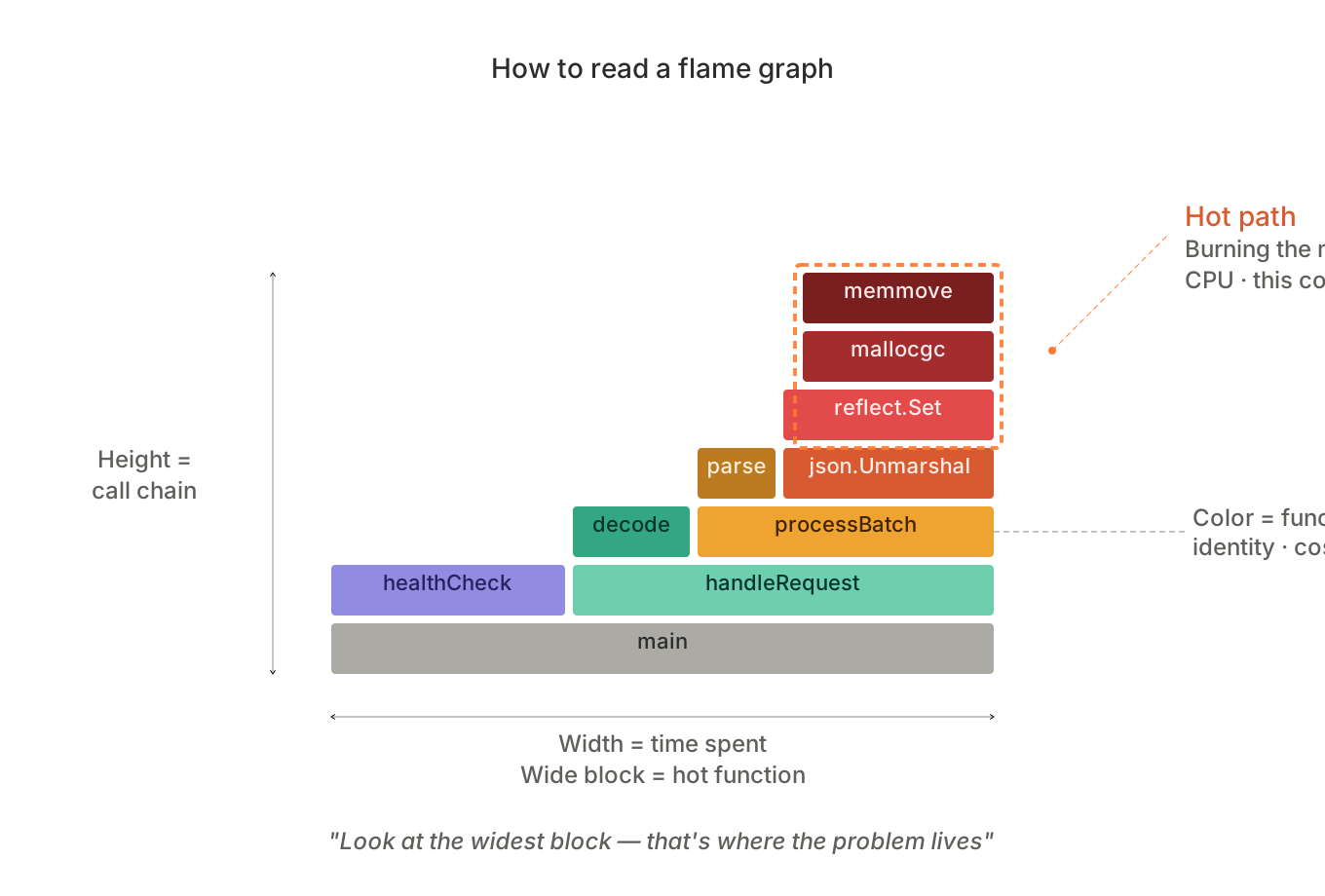
- Width = time. The wider a block, the more CPU that function eats. Look at the widest block — that's where the problem lives.
- Height = call chain. Bottom-up:
main → handler → service → repository → database. Tall towers usually mean deep recursion or too many abstraction layers. - Color = function identity. The same function is always the same color. It's not a meaningful encoding, just a visual handle.
In the first few days you'll be surprised at how much time goes into JSON encoding. Then you'll get angry at why you're waiting 200ms on a mutex. Eventually you start thinking "what if I pooled this allocation?" Congrats — that's the day you became a performance engineer.
Bonus round: the madness of combining this with PGO
Since Go 1.21, Profile-Guided Optimization is standard. Feed the compiler an actual production profile and it'll know which functions are on the hot path, inline them aggressively, eliminate dead code, and devirtualize calls. Typical wins: 2-7%, basically for free, no code changes required.
In Pyroscope 2.0, pulling a PGO file from live data is a one-liner with profilecli:
profilecli query merge \
  --query='{service_name="meshr.controller", env="prod"}' \
  --profile-type="process_cpu:cpu:nanoseconds:cpu:nanoseconds" \
  --from="now-30m" \
  --to="now" \
  --output=pprof=./default.pgo
Then go build -pgo=auto — the compiler takes care of the rest. Bake this into your build pipeline and every release gets optimized based on the previous release's profile. It's a self-feeding loop, and it's deeply satisfying.
Practical notes (so future-you doesn't get bitten)
- Disabled by default. Mutex and block profiling are off because both have non-trivial runtime cost. Use the
SetMutexProfileFraction(5)style sampling above (1/N), and try to keep their overhead under 5%. DisableGCRunsflag stops Pyroscope from forcing a GC during heap profiling — easier on CPU for high-allocation services, but the heap snapshot gets a bit fuzzier. Trade-off.- Migrating to 2.0: the module path is now
github.com/grafana/pyroscope/v2. Helm chart 2.0.0 introducesarchitecture.storage; the oldenable-v1-write-path/enable-v1-read-pathflags are gone. Check the migration guide before upgrading. - HTTP endpoint conflict. The standard
net/http/pprofand Pyroscope's own profiler both want/debug/pprof/profile. Pyroscope'shttp/pprofpackage handles this gracefully, but verify with your own hands.
Wrapping up: learning to love profiles
Continuous profiling has been called "the fourth pillar of observability" for a while now. Metrics, logs, traces — and profiles. If you've already got the first three in your stack, the fourth isn't actually that far away — especially if you're on Go, since pprof already does half the work for you.
Pyroscope 2.0 nailed the cost and operational-simplicity side of this. All that's left is to look at the hottest part of your code and ask, "huh, why are we burning here?"
Most of the time, the answer is embarrassingly simple. We're parsing JSON one extra time, holding a mutex too long, doing an unnecessary slice copy. The point isn't to be a hero — it's to see instead of guess.
Happy flame-graphing.
The example config in this post is loosely based on a Meshr controller service. If you want to self-host, Grafana Pyroscope OSS is still free and feature-complete; Grafana Cloud Profiles offers a generous free tier for those who'd rather not run yet another database.